
Local-First Architecture for Web Apps in 2026
 Derar SattoufUpdated Performance
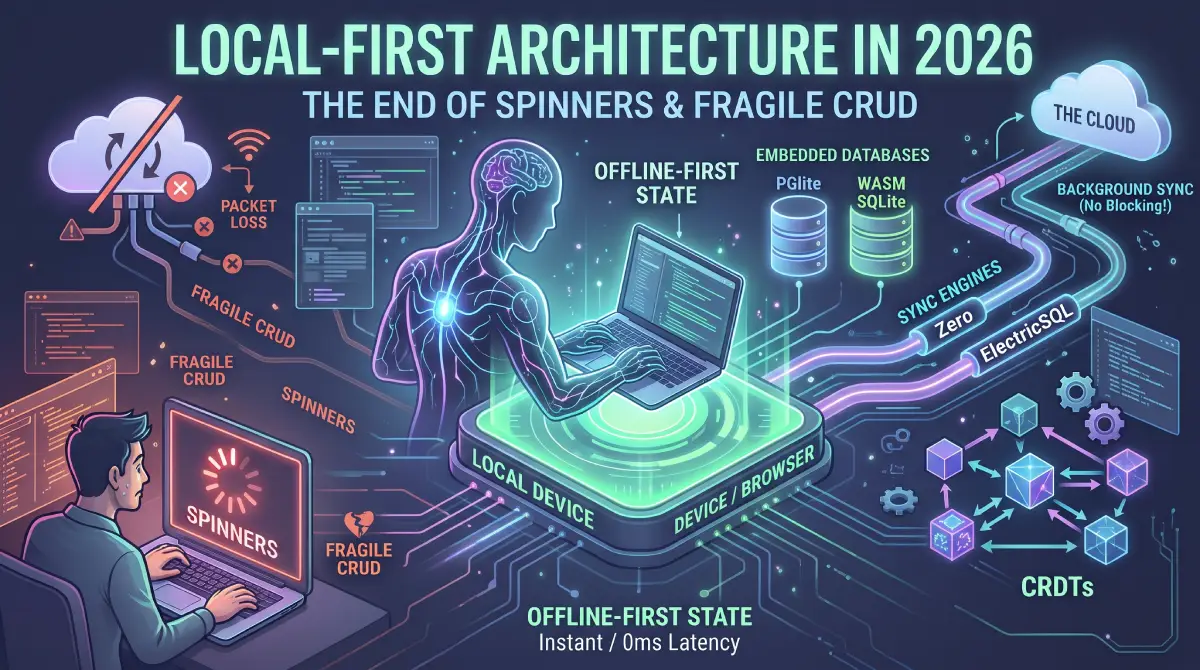
For a long time, web application architecture has run on an unspoken deal: the client is close to an empty terminal, and the server is the single source of truth. Every user interaction (clicking a toggle, submitting a comment, moving a card on a Kanban board) triggers an HTTP request across the internet.
To hide network latency, frontend teams built layers of workarounds: optimistic UI updates, skeleton loaders, debounce hooks, and complex cache invalidation rules in React Query or SWR. The underlying fragility stays. Lose cell coverage on a train or hit a 500ms server hiccup, and the interface stutters or fails completely.
Local-first architecture flips the model. Instead of treating the client as a thin view layer that queries a remote database, the client owns and runs its own embedded, fully transactional database. Reads and writes execute locally in sub-millisecond time. Background sync engines silently replicate changes to the cloud and to other clients whenever there is a connection. By 2026 the tooling, from PGlite to Zero and ElectricSQL, is mature enough to use in production.
The app reads from and writes directly to an in-browser database (WASM SQLite, OPFS, or PGlite). Local reads and writes typically complete in about a millisecond or less, regardless of network speed, though the exact figure depends on the engine and query. Because that database is the primary source of truth, offline support isn't a bolted-on feature. It's the default mode.
Sync engines replace much of the REST or GraphQL layer. Instead of writing dozens of custom CRUD endpoints, the frontend synchronizes authorized slices of data through bidirectional sync protocols (Zero, ElectricSQL, PowerSync). For conflicts, deterministic last-write-wins (LWW) with Lamport timestamps handles standard records, and conflict-free replicated data types (CRDTs) like Yjs or Automerge handle collaborative rich text and complex collections.
The cost is that distributed-systems complexity moves to the client. Client-side schema migrations, row-level synchronization security and storage quota management all have to be handled with care.
The simplest version of this idea needs no sync engine at all. The PDF tools on this site do all their work in the browser and never upload a file, and the PDF Tools case study explains that design.
Cloud-first vs. local-first
To see why local-first feels so responsive, compare the traditional cloud-first request-response loop with a local-first pipeline:
[Traditional Cloud-First Loop]
User Action ──> Optimistic UI (fake) ──> Network Request (100-800ms)
                     │                              │
                     ▼                              ▼
             Revert if failed                Remote DB Write
                     ▲                              │
                     └──────── Network Response ────┘

[Local-First Architecture]
User Action ──> Local In-Memory/WASM DB Write (<1ms) ──> UI Reactive Render (instant)
                                   │
                                   ▼
                      Async Background Sync Protocol
                                   │
                                   ▼
                   Central Cloud Database (Postgres)
In the cloud-first model:
- The network is in the critical rendering path.
- State management code spends much of its complexity juggling loading states, error boundaries, retry loops, and cache invalidation keys (
queryClient.invalidateQueries()). - Data consistency across tabs or simultaneous user edits requires manual WebSocket plumbing.
In the local-first model:
- The network is completely removed from the user interaction loop.
- The UI binds reactively to local database tables or query subscriptions. When data updates in the local database, the UI updates instantly.
- The network is exclusively an asynchronous synchronization transport.
The 2026 Local-First Technology Stack
Building local-first applications used to require writing custom IndexedDB sync layers from scratch. In 2026 there is a mature set of production-grade building blocks:
In-Browser Storage: OPFS and WASM Engines
The foundational enabler of modern local-first web apps is the Origin Private File System (OPFS). Unlike traditional IndexedDB, which suffered from slow transaction serialization and inconsistent browser implementations, OPFS provides a fast, sandboxed, byte-level filesystem accessible by Web Workers.
- SQLite over OPFS: Compiling SQLite to WebAssembly running against OPFS is much faster than IndexedDB for many workloads. Benchmark with your own data, because results depend on the VFS, browser and worker setup.
- PGlite (Postgres in WASM): Created by ElectricSQL, PGlite packages the official PostgreSQL engine into a lightweight WASM binary (~3MB compressed). It runs full Postgres SQL queries—including JSONB operators, CTEs, and full-text search—directly inside the client browser thread or Web Worker without needing an external daemon.
Synchronization Engines
A sync engine sits between the client database and the cloud database, managing change tracking, authorization, and replication.
┌─────────────────────────────────┐
│     Client (Browser/Mobile)     │
│  ┌───────────┐   ┌───────────┐  │
│  │ React UI  │<──│ Local DB  │  │
│  └───────────┘   └─────┬─────┘  │
└────────────────────────┼────────┘
                         │ Replication Protocol
                         ▼
┌─────────────────────────────────┐
│     Sync Engine (Relay/Auth)    │
│  - Row-Level Access Filters     │
│  - Change Data Capture (CDC)    │
└────────────────────────┼────────┘
                         │ Logical Replication
                         ▼
┌─────────────────────────────────┐
│   Central Postgres Database     │
└─────────────────────────────────┘
The leading sync layers in 2026 include:
- Zero (by Rocicorp): A declarative, relational sync engine designed for TypeScript applications. You define schema shapes and sync queries; Zero automatically streams only the rows the user is permitted to see into an in-memory client cache, keeping it updated in real time.
- ElectricSQL: Reads from Postgres logical replication and exposes subsets of tables, called shapes, over plain HTTP so they work with CDNs and ordinary auth proxies. Clients keep the data in memory, in PGlite, or in a client-side store such as TanStack DB. Electric focuses on the read path: writes go through your own API or mutation layer. The project was substantially re-architected in 2024 and 2025, so older tutorials that describe a bidirectional SQLite protocol are outdated.
- PowerSync: A battle-tested offline-first sync layer connecting client SQLite databases to central backends like Postgres, MySQL, or Supabase, with granular sync rules defined in SQL.
Other options worth evaluating:
- TanStack DB: a reactive client-side store with collections and live queries that can be backed by Electric, PowerSync, or your own query layer (the library has been moving quickly through beta; check its status).
- Jazz, Triplit-style and Instant-style platforms: integrated sync backends with their own data models. Check the maintenance status and hosting model before adopting; this segment has seen acquisitions and pivots.
- Dexie (IndexedDB) with Dexie Cloud, RxDB, Evolu, LiveStore: client database plus sync libraries with different trade-offs.
- CRDT-first libraries: Yjs, Automerge, Loro for collaborative documents.
- Do it yourself: for small apps, an IndexedDB or SQLite store plus a mutation queue and a pull endpoint (see the walkthrough below) is often enough.
Because this space changes quickly, evaluate engines on the dimensions in the table below rather than on marketing pages.
| Question | Why it matters |
|---|---|
| Is sync bidirectional, or read-only with your own writes? | Determines how much backend you still write. |
| How are permissions expressed (SQL rules, shapes, query-level)? | Security of partial replication. |
| What is the source of truth (your Postgres, their cloud)? | Lock-in and compliance. |
| What conflict model does it use (server reconciliation, LWW, CRDT)? | Correctness for your data. |
| Which client storage (memory, IndexedDB, OPFS SQLite, PGlite)? | Dataset size and performance. |
| Self-hostable? License? | Operations and cost. |
| Maturity, release cadence, production references? | Risk. |
Conflict Resolution: LWW and CRDTs
When multiple clients modify data while offline, conflicts inevitably occur upon reconnection. 2026 applications divide data into two categories:
- Standard entities (last-write-wins with timestamps): for typical form fields (e.g., updating a user's display name or status), assigning hybrid logical clocks or server-sequenced transaction IDs is sufficient. The most recent valid write wins.
- Collaborative structures (CRDTs): for rich text, document trees, canvases, or shared lists, conflict-free replicated data types (implemented via libraries like
YjsorAutomerge) guarantee that all concurrent edits converge deterministically to the identical state without human intervention or data loss.
Code Examples: Reactive Local Reads and Queued Writes
Sync engines differ a lot in API, and their APIs have been changing, so first look at the shape that every local-first app shares, using only browser primitives. This sketch uses Dexie (a popular IndexedDB wrapper) for local storage, a mutation outbox, and a pull and push sync loop. It is deliberately simple: one record type, last-write-wins by server timestamp.
// lib/local-db.ts
import Dexie, { type Table } from "dexie";

export type Task = { id: string; title: string; completed: boolean; updatedAt: number; workspaceId: string };
export type Mutation = {
  id?: number;
  mutationId: string;                     // idempotency key sent to the server
  type: "upsert" | "delete";
  table: "tasks";
  payload: Task | { id: string };
  createdAt: number;
};

class AppDB extends Dexie {
  tasks!: Table<Task, string>;
  outbox!: Table<Mutation, number>;
  meta!: Table<{ key: string; value: string }, string>;
  constructor() {
    super("app");
    this.version(1).stores({
      tasks: "id, workspaceId, updatedAt",
      outbox: "++id, createdAt",
      meta: "key",
    });
  }
}
export const db = new AppDB();// components/task-list.tsx
"use client";
import { useLiveQuery } from "dexie-react-hooks";
import { db, type Task } from "@/lib/local-db";
export function TaskList({ workspaceId }: { workspaceId: string }) {
// Re-renders whenever the local data changes; never waits for the network.
const tasks = useLiveQuery(
() => db.tasks.where("workspaceId").equals(workspaceId).sortBy("updatedAt"),
[workspaceId],
);
async function toggle(t: Task) {
const next = { ...t, completed: !t.completed, updatedAt: Date.now() };
await db.transaction("rw", db.tasks, db.outbox, async () => {
await db.tasks.put(next);
await db.outbox.add({
mutationId: crypto.randomUUID(), type: "upsert", table: "tasks", payload: next, createdAt: Date.now(),
});
});
void syncSoon();
}
return (
<ul>
{(tasks ?? []).map((t) => (
<li key={t.id}>
<label>
<input type="checkbox" checked={t.completed} onChange={() => toggle(t)} /> {t.title}
</label>
</li>
))}
</ul>
);
}// lib/sync.ts
import { db } from "./local-db";
let running = false;
export async function syncSoon() {
if (running || !navigator.onLine) return;
running = true;
try {
await push();
await pull();
} finally {
running = false;
}
}
async function push() {
const batch = await db.outbox.orderBy("createdAt").limit(50).toArray();
if (batch.length === 0) return;
const res = await fetch("/api/sync/push", {
method: "POST",
headers: { "Content-Type": "application/json" },
body: JSON.stringify({ mutations: batch }),
});
if (!res.ok) return; // keep the outbox; retry later with backoff
await db.outbox.bulkDelete(batch.map((m) => m.id!));
}
async function pull() {
const since = (await db.meta.get("cursor"))?.value ?? "0";
const res = await fetch("/api/sync/pull?since=" + encodeURIComponent(since));
if (!res.ok) return;
const { changes, cursor } = await res.json();
await db.transaction("rw", db.tasks, db.meta, async () => {
await db.tasks.bulkPut(changes.upserts);
await db.tasks.bulkDelete(changes.deletedIds);
await db.meta.put({ key: "cursor", value: String(cursor) });
});
}
window.addEventListener("online", () => void syncSoon());The server side needs three properties, whichever engine you use:
- Idempotent push: store each
mutationIdand ignore repeats, because the client may retry after a timeout. - Authorization per mutation: validate that the user may write that workspace; never trust the client's table and id.
- A monotonically increasing cursor for pull: a server-assigned version or sequence number, not the client's clock, so clients can ask for everything since the last cursor.
Notice what the UI does not have: loading spinners for ordinary interactions, useEffect fetching, or rollback logic. It has new responsibilities instead: handling rejected mutations (show an error, or revert the local row), schema migrations, and sync status indicators.
With a sync engine instead of hand-rolled sync
With an engine, the same app reduces to declaring what to sync and where writes go. The following shows the shape using ElectricSQL shapes and TanStack DB collections. Treat the code as an outline: both libraries move quickly, so copy the current quickstart from their documentation instead of this sketch.
// Outline only: verify imports and options in the current docs
import { createCollection } from "@tanstack/react-db";
import { electricCollectionOptions } from "@tanstack/electric-db-collection";

export const tasksCollection = createCollection(
  electricCollectionOptions({
    id: "tasks",
    shapeOptions: { url: "/api/shapes/tasks" },   // your auth proxy in front of Electric
    getKey: (task) => task.id,
    onInsert: async ({ transaction }) => {
      // send the mutation to YOUR API; return when the server confirms
    },
  }),
);
Always put your own authenticating proxy in front of the shape endpoint, and decide the shape's where clause on the server from the user's session, never from client input.
Architectural Challenges & Production Realities
While local-first unlocks incredible user experiences, it introduces real distributed-systems challenges that frontend engineers must prepare for:
Client-Side Schema Migrations
In a traditional web app, running a database migration is a single centralized operation: you run prisma migrate deploy or drizzle-kit push in CI/CD against Postgres.
In a local-first application, there are thousands of client databases distributed across laptops, smartphones, and tablets, running various versions of your software.
- You must write backwards-compatible migrations.
- When a user opens an offline tab after six months, the client database must cleanly upgrade its local schema through progressive migration scripts before executing sync protocols.
Authorization and Partial Replication
You cannot replicate an entire 50GB PostgreSQL database to a user's phone.
- The sync engine must enforce strict shape scoping or row-level security (RLS).
- A user must only synchronize data belonging to their active workspaces or tenants.
- Access tokens must be verified before changes stream to the client.
Storage Quotas and Eviction Policies
Mobile browsers have strict storage quotas (often 1GB to 2GB per origin depending on available disk space).
- Applications must define clear eviction strategies for historical records (e.g., retaining the last 90 days of activity locally while archiving older records in cloud cold storage).
- Handle browser storage eviction warnings gracefully by requesting persistent storage permissions (
navigator.storage.persist()).
When to Choose Local-First (and When to Avoid It)
Local-first is not a silver bullet for every web project. Use this decision matrix:
| Application Type | Recommendation | Why |
|---|---|---|
| Productivity Tools (Notes, Docs, Tasks) | Strong Yes | Users demand instantaneous responsiveness, offline editing, and frictionless multi-device synchronization. |
| Creative Tools (Canvases, Design, Audio) | Strong Yes | Heavy state changes and high-frequency interactions require zero-latency local execution. |
| B2B SaaS / Workspaces (Linear, Notion style) | Strong Yes | Power users spend entire workdays in the tool; eliminating loading spinners drives high customer retention. |
| E-Commerce & Ticket Booking | No | Requires centralized, strict single-source-of-truth inventory locks (preventing double-selling concert seats). |
| Financial Ledgers & Banking | No | Centralized audit trails and strict atomic transactions must settle in authoritative cloud ledgers. |
| Public Social Media / Massive Feeds | Hybrid | Read public global feeds from edge CDNs; store user drafts, bookmarks, and private chats local-first. |
Designing the data model for sync
- Stable client-generated IDs (UUIDv4 or v7, ULID) so rows can be created offline without asking the server.
- Soft deletes (a
deletedAtcolumn or a tombstone) so deletions replicate; hard deletes leave no trace for offline clients to learn from. updatedAtand a server version: use the server version for ordering and cursors; use client time only for display.- Per-field versus per-row conflict handling: row-level LWW can overwrite a teammate's unrelated field edit. Model independent fields as separate columns with their own timestamps, or use a CRDT for text-like fields.
- Invariants that must hold globally (unique usernames, inventory counts, balances) cannot be enforced locally. Route those writes through a server mutation that can reject, and design UI states for "pending" and "rejected".
- Ordering lists: use fractional indexing or a CRDT list rather than integer positions, which collide when two users insert at once.
// Fractional ordering: insert between two items without renumbering
import { generateKeyBetween } from "fractional-indexing";
const orderKey = generateKeyBetween(prevItem?.orderKey ?? null, nextItem?.orderKey ?? null);
Security checklist
- Authorize on the server for every replicated shape and every mutation; the client database is not a trust boundary.
- Keep tokens short-lived and refresh them for long-lived sync connections.
- Think about data on lost devices: encrypt sensitive local data where feasible (the browser cannot protect against a compromised profile), support remote sign-out, and wipe local data on logout.
- Do not replicate data the user is not allowed to see, even if the UI hides it.
- Consider end-to-end encryption if the server must not read content; it constrains search and server-side logic.
- Validate data again on the server; a modified client can send anything.
Testing local-first apps
- Simulate offline with browser DevTools or Playwright (
context.setOffline(true)), make edits, go online, and assert convergence. - Test two clients editing the same record concurrently, in both orders, and assert identical final state.
- Test schema migrations from every supported old version using stored database fixtures.
- Fuzz the sync protocol with random operation sequences and verify convergence (property-based testing).
- Test quota exhaustion and eviction behavior.
import { test, expect } from "@playwright/test";

test("edits made offline sync when back online", async ({ page, context }) => {
  await page.goto("/tasks");
  await context.setOffline(true);
  await page.getByRole("button", { name: "Add task" }).click();
  await page.getByLabel("Title").fill("Offline task");
  await page.keyboard.press("Enter");
  await expect(page.getByText("Offline task")).toBeVisible();   // appears instantly, no network

  await context.setOffline(false);
  await expect.poll(async () => (await page.request.get("/api/tasks")).text()).toContain("Offline task");
});
Where this usually goes wrong
- Treating the local database as a cache with no conflict story. Decide the conflict rules per entity before writing code.
- Syncing everything to everyone instead of authorized slices.
- Using client clocks as the source of ordering.
- Forgetting migrations for old clients, which then crash on startup.
- No UI for sync state (offline, syncing, failed) or for rejected writes.
- Storing secrets or tokens in IndexedDB without considering XSS exposure.
- Building real-time collaboration with last-write-wins on a long text field.
- Ignoring Safari and mobile browser storage limits and eviction rules; call
navigator.storage.persist()and handle denial. - Adopting a young sync engine for a regulated or revenue-critical system without an exit plan and export path.
Questions that come up
Is local-first the same as offline-first? Offline-first treats offline as a mode to support. Local-first goes further: the local copy is the primary working copy, data lives on the user's devices, sync is a background concern, and ideally users retain ownership of their data.
Do I need a CRDT? Only for concurrent editing of the same structure (text, lists, canvases). Most business records work well with server-reconciled mutations and per-field last-write-wins.
Can I use it with Next.js server components? Yes, but local-first data lives in client components; render a shell on the server and hydrate the local data in the client. See Next.js Server Components and caching.
How much data can I store in the browser? Browsers allow a large share of free disk to each origin, but quotas and eviction vary. Query navigator.storage.estimate() and request persistent storage.
What about SEO and first load? Public content should still be server-rendered. Local-first is best for authenticated app surfaces, and the initial sync needs a loading strategy (sync the most important slice first).
Is the OPFS API widely available? The main browsers support it today, with some features (like synchronous access handles) limited to workers; check caniuse for your targets.
Sources and docs
- Local-First Software: You Own Your Data (Ink and Switch essay)
- localfirst.fm and the Local-First Web community
- ElectricSQL documentation
- PGlite
- PowerSync documentation
- Zero by Rocicorp
- Yjs documentation
- Automerge
- MDN: Origin private file system
- Dexie.js